
Cash Activity Tracker
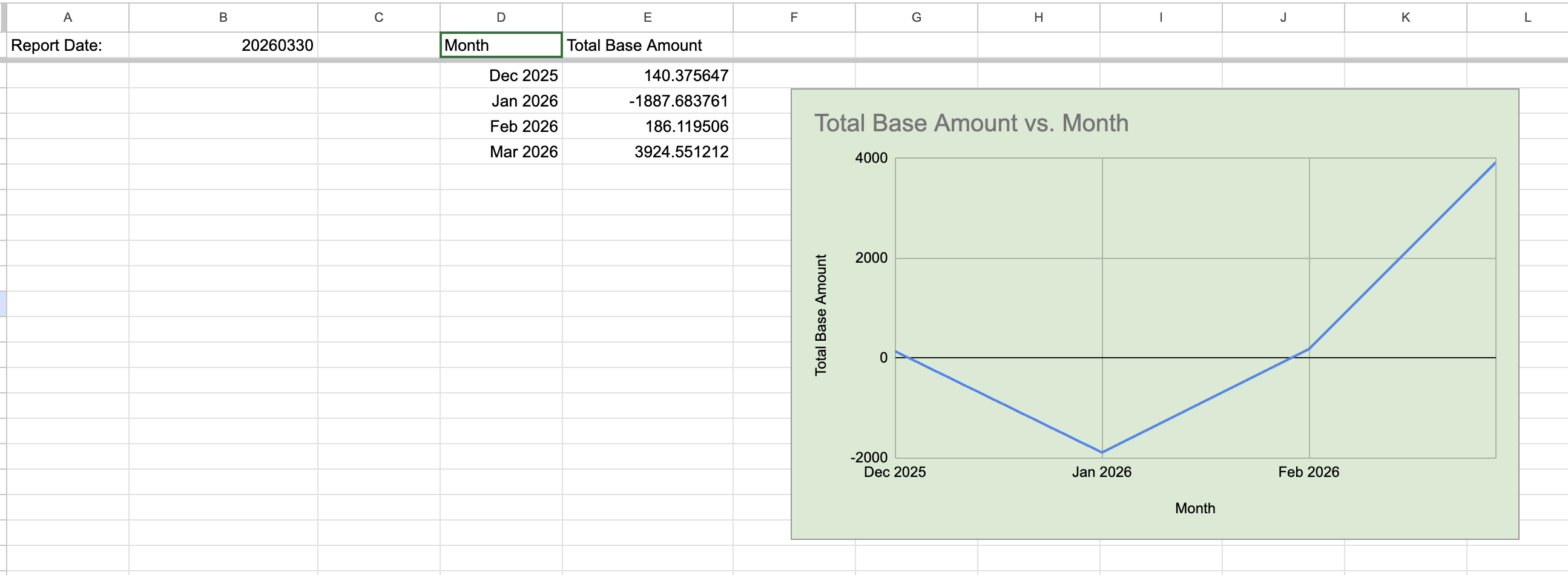
The Cash Activity Tracker is a streamlined financial monitoring template designed to aggregate and visualize monthly cash flow trends. By automatically processing raw transaction dates and multi-currency values, it provides a normalized view of your liquidity, ensuring all figures are converted into a consistent base currency for accurate month-over-month comparison.
Key Features
📅 Automated Monthly Aggregation
- Smart Date Parsing: Uses logic to transform raw date strings (e.g., "202512") into standard calendar months.
- Chronological Grouping: Automatically organizes all activity into a clean, time-based summary for better historical tracking.
🌍 Multi-Currency Normalization
- Base Currency Alignment: All calculations utilize the
FXRateToBasefield to ensure a consistent "Total Base Amount." - Global Visibility: View the true value of your cash flow in your primary currency, regardless of the original transaction's currency.
📉 Net Cash Flow Dynamics
- Inflow & Outflow Tracking: Captures both positive gains and negative deficits (as seen in the Jan 2026 data) to reveal your net liquidity.
- Performance Snapshots: Instantly see which months yielded the highest capital growth versus significant expenditures.
📊 Dynamic Visual Trend Analysis
- Integrated Charting: Features a built-in graph that plots the "Total Base Amount" over time to highlight seasonal patterns.
- Visual Clarity: Quickly spot significant capital shifts or trends at a glance without digging through raw numbers.
Cash Transactions
Detail
| Field Key | Description |
|---|---|
| Amount | The raw monetary value of the transaction. This is the core numerical input for the "Net Cash Flow Dynamics" feature, allowing the template to sum up all inflows and outflows to determine your total liquidity for a given period. |
| FXRateToBase | To ensure a "like-for-like" comparison in your base currency, the spreadsheet applies this conversion rate from asset currency to base currency. This allows the dashboard to adjust all global holdings into a single, unified currency view. |
| LevelOfDetail | The template use this field to filter the data for Detail only. This ensures the spreadsheet ignores high-level account summaries and only imports the granular, trade-specific data needed for accurate reporting. |
| ReportDate | The date of the statement. This acts as the "As Of" timestamp for your dashboard. |
| Type | The transaction type, This is need to filter out the "Deposits/Withdrawals". |
Structure & Tabs
- Welcome: The cover page containing basic template information, version history, and setup instructions.
- Dashboard: The core visualization hub. If the template includes charts or performance metrics, they are displayed here.
- Dashboard_backend (Hidden): Background tab for data processing. Please DO NOT modify this tab; it is for internal logic only.
-
Trades to Sheets_import:
Automated: If using "Trades to Sheets," your broker data syncs here automatically.
Manual: Otherwise, manually paste your raw data here to update the Dashboard.
-
-
Demonstration Purposes Only: This template is intended to demonstrate system capabilities and help users understand the setup process; please verify all results independently.
-
-
Non-Real-Time: Data is not live. Please verify the "Report Date" within the spreadsheet for the latest sync info.
-
-
No Professional Audit: Formulas have not been audited by professionals. Consult a financial advisor before making investment decisions.
-
-
Updates: Implementation and formulas may be updated at any time without prior written notice.